Google Search Central has changed the way its systems extract JSON-LD from HTML.
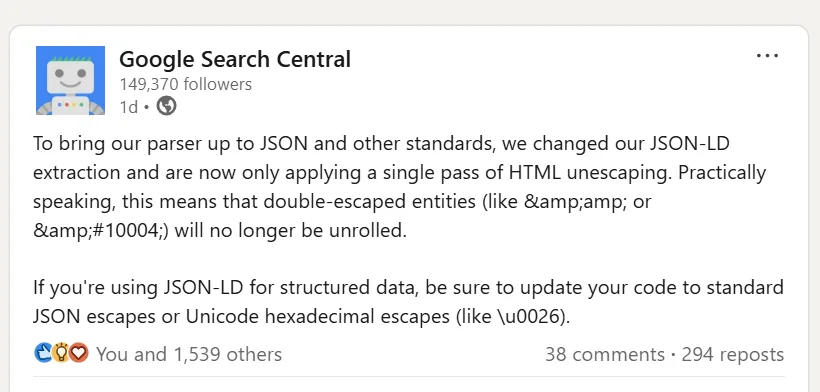
In a recent announcement, Google said its parser will now perform only a single pass of HTML unescaping when extracting JSON-LD. The change is intended to bring the extraction process closer to JSON and other relevant standards.
For websites with correctly generated structured data, this may have no practical effect. The change becomes important when a site’s JSON-LD contains values that have been HTML-escaped more than once.
Google specifically called out examples such as & and ✔. These values were previously subject to repeated unescaping. With the new behavior, Google stops after the first pass.
That sounds like a small implementation detail, but it is worth understanding because the problem can exist inside otherwise valid JSON-LD.
What does single-pass HTML unescaping mean?
HTML uses character references to represent certain characters. An ampersand, for example, can be written as &.
If a value is escaped twice, the result becomes &.
Consider a simple value:
Tom & Jerry
After one HTML-escaping operation, it becomes:
Tom & Jerry
If another layer escapes the already escaped value, it can become:
Tom & Jerry
The two versions are not equivalent as raw strings.
Under a parser that repeatedly unescaped the value, & could eventually become &. Google’s new behavior stops after one pass. The result after that first pass is &.
The same thing happens with numeric character references. Google used ✔ as another example in its announcement. One unescaping pass produces ✔; the parser does not continue with another pass to turn that into the checkmark character.
The important point is that Google’s parser is no longer trying to clean up multiple layers of HTML encoding for the site.
Why can this happen inside JSON-LD?
JSON-LD is JSON, but websites normally place it inside an HTML document:
<script type="application/ld+json">
{
  "@context": "https://schema.org",
  "@type": "Organization",
  "name": "Example Company"
}
</script>
That means structured data can pass through several systems before it reaches Google.
A CMS may store a value one way. A template engine may escape it when rendering the page. A Schema plugin may serialize it again. A developer may then apply another transformation before the final HTML is generated.
The problem usually isn’t intentional. It can appear because different parts of a website’s stack assume that another layer will handle escaping.
This is particularly relevant for large sites where structured data is generated automatically rather than written directly into templates.
HTML escaping and JSON escaping are different things
A lot of confusion around this change comes from treating HTML escaping and JSON escaping as the same process.
They aren’t.
HTML has character references such as:
&
<
>
"
JSON has its own escaping rules. Unicode characters can also be represented using hexadecimal escapes such as:
\u0026
The latter represents an ampersand.
JSON-LD is defined as a JSON-based serialization for linked data, and the JSON-LD specification is designed to work with existing JSON parsers.
That distinction matters when generating structured data. If a value needs to be escaped as part of JSON serialization, the JSON serializer should handle that job. The application shouldn’t depend on a later HTML parser performing several rounds of entity decoding.
A simple example
Suppose a company name is:
Smith & Sons
A correctly serialized JSON-LD value can contain the literal ampersand:
{
  "@type": "Organization",
  "name": "Smith & Sons"
}
A JSON Unicode escape can also represent the same character:
{
  "@type": "Organization",
  "name": "Smith \u0026 Sons"
}
What deserves investigation is something like:
{
"@type": "Organization",
"name": "Smith &amp; Sons"
}
Here the value has clearly passed through more than one layer of HTML escaping.
Google’s new extraction behavior means developers should no longer assume that Google will keep decoding the value until it reaches the intended character.
Where are you most likely to find this?
The risk is higher when structured data is generated through several systems.
A WordPress site using a Schema plugin, for example, may take information from a post or product field and pass it through PHP, a plugin, and the page template before the final HTML is delivered.
The same issue can occur on an ecommerce platform where product information comes from a database or API and is subsequently processed by a frontend application.
Headless CMS implementations are another area worth checking. Content can already contain HTML-encoded values when it reaches the frontend, where another escaping layer may be applied during rendering.
Custom structured-data implementations deserve particular attention because the escaping behavior depends entirely on how the developer has built the serialization pipeline.
The affected value could be a company name, product title, description, URL, review text, address or any other property containing special characters.
Does this mean existing Schema is broken?
No.
There is no reason to assume that every JSON-LD implementation is affected by this change.
If your structured data is generated as proper JSON and the final output does not contain double-escaped entities, this particular change should not require a rewrite.
The first thing to establish is whether your website actually produces the kind of markup Google is talking about.
This is also why replacing every & in your Schema with \u0026 would be a poor response. The problem is not the presence of an ampersand. The problem is unnecessary or incorrect encoding.
How should developers check their implementation?
Start with the actual HTML delivered by the website.
Open a representative page and inspect the JSON-LD inside the:
<script type="application/ld+json">
block.
Search for patterns such as:
&amp;
and:
&#
These are useful indicators that an entity has gone through an additional HTML-escaping operation.
You should also check values that contain characters commonly affected by escaping. Product names containing ampersands are an easy example. The same applies to descriptions, author names, business names and URLs containing query parameters.
Testing several page types is more useful than checking hundreds of URLs individually. If the same Schema template generates markup across thousands of product pages, a problem in that template can affect the entire set.
Use Google’s testing tools, but inspect the output
Google recommends the Rich Results Test for checking structured data that can be used for Google Search features. Its documentation also recommends using the URL Inspection tool to see how Google processes a page.
For this particular issue, simply seeing a successful validation result shouldn’t end the investigation.
Look at the values that are actually being parsed.
A JSON-LD block can still be syntactically valid JSON while containing a string whose value is not what the developer intended. A parser may have no reason to reject the JSON just because a string contains the characters &.
That makes this a slightly different debugging exercise from finding a missing comma or malformed JSON.
What is the correct fix?
The fix belongs in the data-generation process.
If a CMS stores:
Smith & Sons
the application should serialize that value correctly when creating the JSON-LD. It should not repeatedly HTML-escape the value and then rely on Google to decode it later.
Where a JSON Unicode escape is appropriate, an ampersand can be represented as:
\u0026
Google specifically recommends standard JSON escapes or Unicode hexadecimal escapes such as \u0026 in its announcement.
The important thing is to fix the layer that introduced the additional escaping. Adding another decoding step just before the JSON-LD reaches the browser can hide the underlying problem and may create other issues.
Developers should also be careful about simply removing all escaping from a JSON-LD output process. The correct serialization strategy depends on how the data is inserted into the HTML and how the application handles characters that have special meaning inside a script element.
What does this mean for SEO?
For SEO teams, this is primarily a structured-data implementation issue.
Google uses structured data to understand page content, and correctly implemented structured data can make a page eligible for certain rich search features. Google also recommends validating structured data during development and monitoring it after deployment.
That makes this worth checking on sites that rely heavily on structured data, particularly ecommerce websites and large publishing platforms.
However, there is currently no reason to describe Google’s announcement as a ranking update. Google has announced a change to JSON-LD extraction. It has not said that pages with double-escaped entities will receive a direct ranking penalty.
The more immediate concern is whether Google extracts the structured-data values correctly.
If a product name, organization name or another property is being extracted with leftover HTML entities, the structured data may no longer represent the value that the site intended to provide.
A practical audit for technical SEOs
A useful audit does not require checking every URL.
Take a sample from each major template that generates JSON-LD. For an ecommerce website, that could mean a product page, category page and organization-level markup. For a publisher, it could include an article, author page and homepage.
Inspect the raw HTML and look inside each JSON-LD block for double-escaped entities.
Then run representative URLs through Google’s Rich Results Test and examine the parsed properties. Google specifically recommends the Rich Results Test for validating structured data, while the Schema Markup Validator can be used for broader Schema.org validation.
If the source contains values such as &amp;, trace that value back through the CMS, database, plugin, template or application responsible for generating the markup.
The goal is to find the point where the second escaping operation is introduced.
Why Google’s change is worth paying attention to
The change itself is fairly narrow. Its wider lesson is more useful.
Structured data sits at the intersection of content systems, programming languages, HTML and search-engine parsers. When several layers manipulate the same value, small differences in how those layers handle escaping can produce unexpected output.
Google’s previous extraction behavior could effectively hide some of those implementation problems. With single-pass HTML unescaping, those problems are more likely to remain visible in the extracted value.
For developers, the answer is to generate JSON-LD using proper JSON serialization.
For SEOs, the answer is to inspect the structured data that is actually being delivered and parsed rather than assuming that the markup is correct because the visible page looks fine.
For site owners, there is no need to make blanket changes to Schema markup. The sensible approach is to check whether the site is producing double-escaped entities and fix them where they exist.
Final takeaway
Google has changed its JSON-LD extraction so that HTML unescaping happens once. Double-escaped entities such as &amp; and &#10004; will no longer be repeatedly decoded.
Websites that already generate clean JSON-LD should be largely unaffected. Sites with multiple layers of HTML escaping should review how their structured data is generated.
If you maintain custom Schema, manage a CMS, or work on a large ecommerce or publishing site, this is a good reason to inspect the actual JSON-LD output on a few representative pages.
The fix is straightforward: generate standards-compliant JSON-LD and use JSON’s own escaping mechanisms where escaping is necessary. Google has made it clear that developers should not rely on repeated HTML unescaping to turn incorrectly encoded data into the value they originally intended.