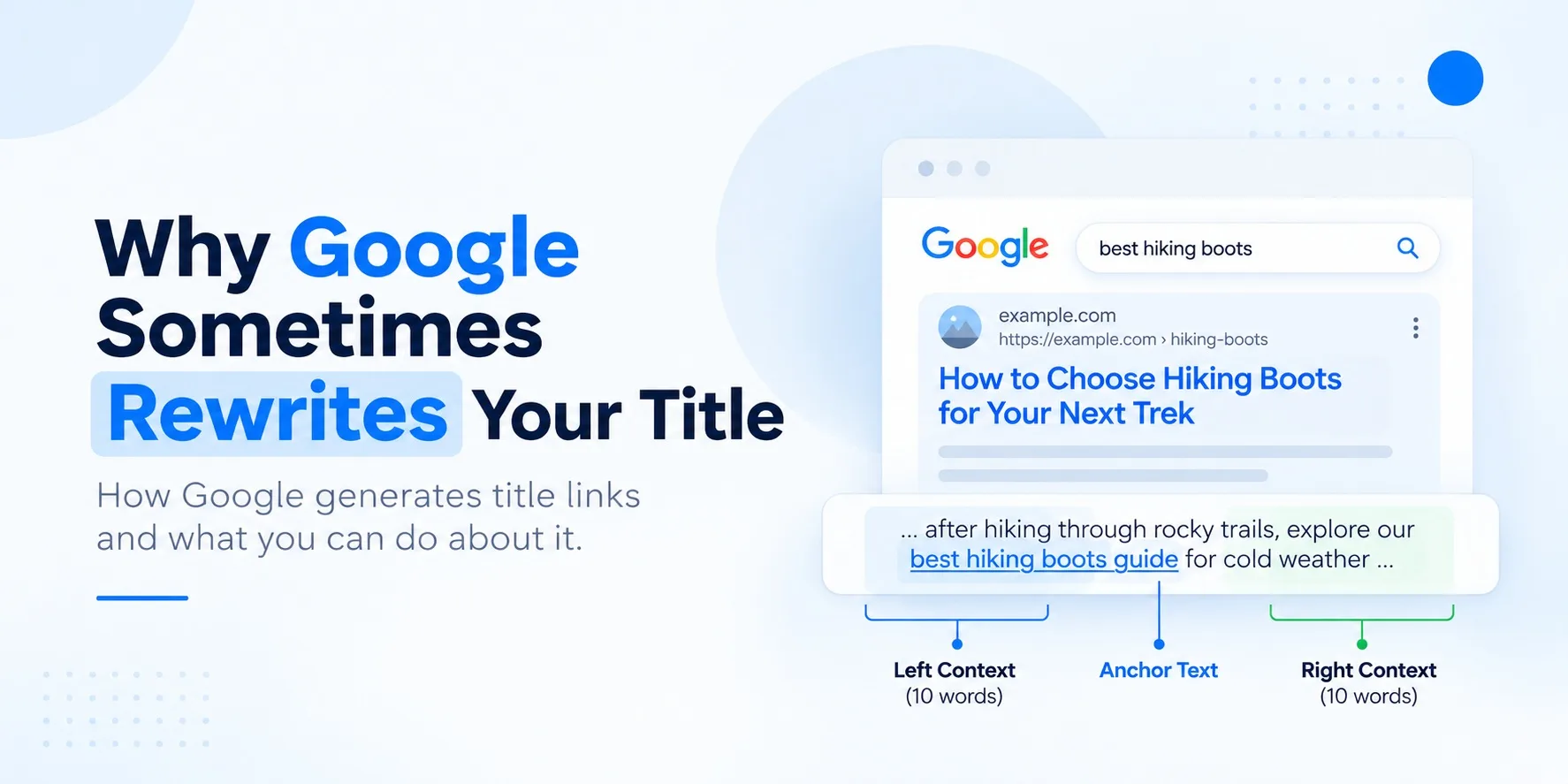
You wrote the title. Google changed it.
I have lost count of the audits where a client sends me a screenshot with the same complaint. They spent an afternoon on a title tag, shipped it, and a week later Google is showing something else in the search results. Sometimes it is their H1. Sometimes it is a trimmed version of the original with the brand name missing. Occasionally it is a phrase pulled from somewhere halfway down the page.
The reaction is usually panic, and I understand why. The title is the first thing a searcher reads. It sets expectations about what they will find after the click, and it carries a lot of the weight when someone decides between your result and the one below it. If Google swaps in wording you did not choose, it feels like you have lost control of your own storefront sign.
Here is the distinction that calms most of those conversations down. The HTML <title> element is something you write. The title link is something Google generates. Your title tag is one input into that process, and usually the strongest one, but Google treats it as a suggestion. Once you see it that way, a rewrite stops looking like a penalty and starts looking like a diagnostic signal: Google found something on the page it trusted more than the tag you wrote. The useful question is what that something was.
What is a Google title link?
Google defines a title link as the title of a search result that links through to the web page. It is the blue clickable headline above the URL and snippet. Google’s documentation says it generates these automatically, and that site owners can influence them.
Four page elements get confused with it constantly, so it is worth separating them.
| Element | Where it lives | Who controls the final output |
|---|---|---|
| HTML <title> | In the <head>, shown in the browser tab | You |
| H1 heading | The main visible heading on the page | You |
| Meta description | In the <head>, a candidate for the snippet under the title link | You write it; Google decides whether to show it |
| og:title | In the <head>, used by social platforms when the page is shared | You write it; each platform decides how to display it |
| Google title link | The headline in Google’s results | Google, using all of the above and more |
The practical takeaway is that the title tag and the title link are two different objects. Most of the time they match. When they do not, you are seeing Google’s reading of the page overrule your tag.
How does Google generate title links?
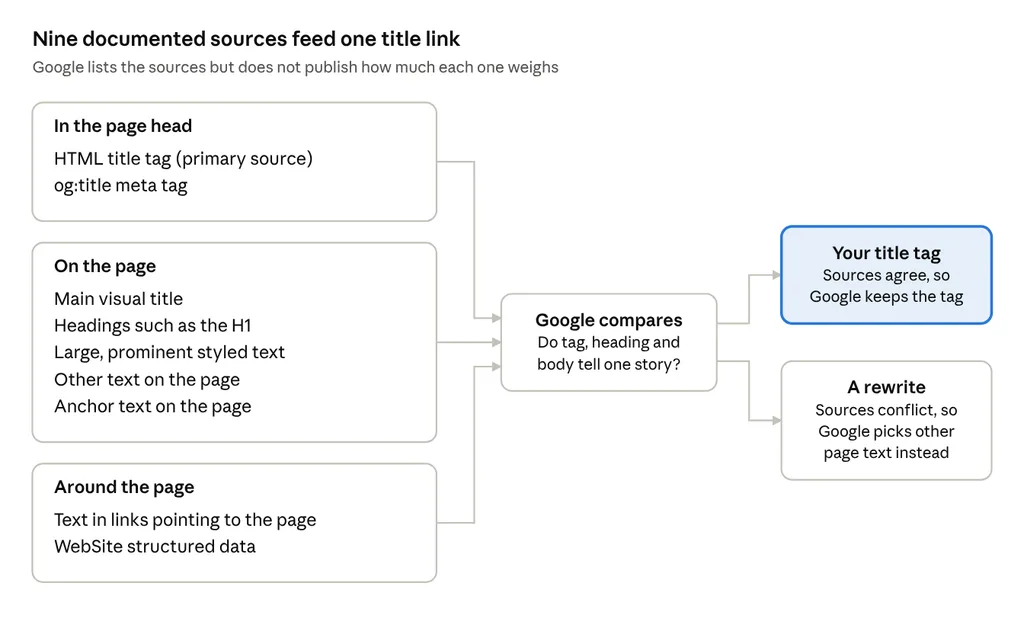
Google publishes the list of sources it draws from. It does not publish how much weight each one carries, so everything below about priority is my observation from audits rather than a documented rule. The documented sources are: content in <title> elements, the main visual title on the page, heading elements such as <h1>, content in og:title meta tags, other large and prominent text, other text on the page, anchor text on the page, text in links pointing to the page, and WebSite structured data.
Title link sources · 9 inputs, 2 outcomes
When the head, the page and the links around it describe the same thing, Google has no reason to look past your title tag.
The HTML title tag
The title tag is still the primary source. When Google refined its title system in September 2021, it said original title elements were being used around 87% of the time, up from roughly 80% when the change first rolled out. That number is five years old, so I would not quote it as current, but it tells you the default outcome is Google keeping your tag. Google’s guidance for the tag itself is short: every page gets one, it should be descriptive and concise, unique to the page, free of repeated keywords, and it should avoid vague labels like “Home” or “Profile.” There is no character limit, though long titles get truncated to fit the device.
The main visible title and H1
The H1, or whatever text is visually styled as the main title, is the source I see Google reach for most often when it overrides a tag. That makes sense. The heading is what a visitor actually reads when the page loads, so it is a strong signal of what the page claims to be. Google explicitly recommends making the main title visually distinct, for example by using a larger font or placing it in the first visible <h1>. When the H1 and the title tag describe two different pages, Google has to pick one, and it often picks the one users can see.
Other prominent page text
Google also looks at other large text and other content on the page. This is how it fills gaps. If a page has three headings styled identically, Google says it may simply use the first. If a title is missing a detail that appears prominently on the page, such as a season number or a product name, Google can pull that detail in.
The og:title meta tag
og:title is listed as a source, and Google’s page says nothing more about it. I treat it as a consistency check. If your og:title tells social platforms the page is about one thing and your title tag says another, you have given Google two competing labels for free. Keep them aligned, or at least compatible.
Links and anchor text
Two link signals appear on the list: anchor text within the page, and the text of links pointing to the page. The second one matters most when Google cannot see your content. Google notes that if robots.txt blocks crawling, the URL can still be indexed, and in that case Google leans on off-page signals like anchor text from other sites. This is why you occasionally see a blocked URL in results with a title nobody on the team wrote.
Structured data
WebSite structured data is the last listed source, and Google links it to its site name guidance. In practice, it helps Google understand the site name it shows alongside results. It does not give you a way to dictate the title link for an individual page, and nothing in the documentation suggests otherwise. If you are implementing it, my schema markup guide walks through the setup.
Why does Google rewrite your title tag?
Google documents a handful of specific problems that trigger rewrites: half-empty titles, obsolete titles, inaccurate titles, micro-boilerplate, pages with no clear main title, language or script mismatches, and site names repeated in the title. In my audits, nearly every rewrite traces back to one of six causes, which overlap heavily with Google’s list.
The title is outdated. This is the most common one I find, and Google uses it as an example: a title still says “2020 admissions criteria” while the visible heading says 2021, so Google uses the year from the heading. Annual roundups are the usual culprits, because someone updates the H1 and the body in January and forgets the tag.
The title is inaccurate. The tag promises something the page does not deliver. Google’s example is a category page titled “Giant stuffed animals, teddy bears, polar bears” whose inventory has changed, which Google may shorten to “Stuffed animals.” Dynamic templates on ecommerce sites produce this constantly.
The title is vague. Titles like “Services” or “Our Approach” tell a searcher nothing. Google calls out “Home” and “Profile” by name as labels to avoid. With nothing useful to work with, Google goes looking for something better on the page.
The title is boilerplate. Google calls this micro-boilerplate: a set of pages that share an identical title, like episode pages for a TV show that all read “My so-called amazing TV show.” Google can detect the season number on the page and add it. A related case is the half-empty title, where a template outputs only “| Site Name” because the variable for the page name came back blank.
The title conflicts with visible content. The tag targets one query and the H1 describes another page entirely. Pages that were optimized by one person and written by another tend to drift this way, which is why I treat content optimization as one job covering the tag, the heading and the copy.
The title is poorly written. Stuffed with repeated variations, or so long that the meaningful part sits past the truncation point. Google says repeating the same words provides little value to users and can look spammy.
| Cause | Problem title | Clearer alternative |
|---|---|---|
| Outdated | Best Project Management Tools for 2024 | Best Project Management Tools for 2026 (with the H1 and body updated too) |
| Inaccurate | Red, Blue and Green Running Shoes | Store | Women’s Running Shoes | Store |
| Vague | Services | Technical SEO Audit Services | SEORocket |
| Boilerplate | Product Details | Store (on 400 product pages) | Trail Runner X2 Waterproof Shoe | Store |
| Conflicting | Cheap Flights to Goa | H1 and title both: Goa Travel Guide: When to Go and Where to Stay |
| Poorly written | SEO Tips, SEO Tips 2026, Best SEO Tips, Free SEO Tips | 12 Technical SEO Tips That Hold Up in 2026 |
Those examples are mine, written to show the pattern. They are not taken from Google’s documentation.
Before and after: a rewritten title in practice
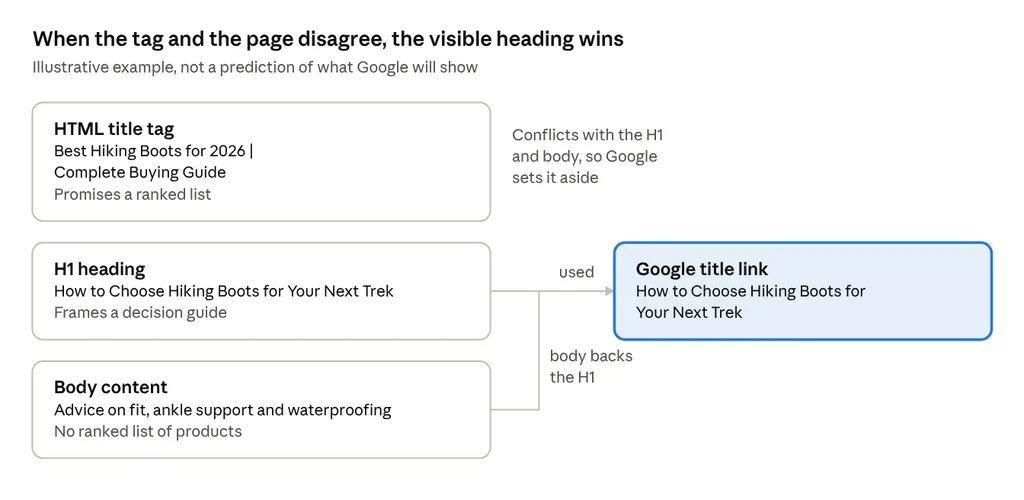
Here is the scenario I see most often, in its simplest form. This is an illustration of the pattern. It is not a prediction of what Google will display for any particular page.
Hiking boots example · tag vs H1 vs body
The title tag says “best” and promises a ranked list. The H1 says “how to choose” and frames the page as a decision guide. When Google reads the page and finds advice on fit, ankle support and waterproofing with no ranked list of products, the H1 is the more accurate description. So that is what it shows.
The fix depends on which version is true. If the page really is a buying guide with picks, the H1 and the content need to say so. If it is a how-to-choose guide, the title tag should stop pretending to be a listicle. Either way, the goal is one story told three times: tag, heading, body.
How to reduce unwanted title rewrites
None of this guarantees Google will use your exact tag. What it does is remove the reasons Google has to look elsewhere. I run through this list on every important URL before I move on to more advanced on-page work.
- ☐ Every important URL has a unique, descriptive title tag.
- ☐ The page’s primary topic sits near the start of the title where it reads naturally.
- ☐ The title tag, the H1 and the opening content describe the same page.
- ☐ No generic labels and no stacked keyword variations.
- ☐ Dates, prices and versions are updated everywhere at once: tag, heading and body.
- ☐ There is one obvious main heading, styled more prominently than anything else above the fold.
- ☐ Templates cannot output a half-empty title when a variable is missing.
- ☐ The og:title matches or closely tracks the title tag.
- ☐ Internal anchor text pointing to the page describes it accurately.
- ☐ The title is in the same language and script as the page’s main content.
- ☐ The site name appears once, at the start or end, separated by a hyphen, colon or pipe.
- ☐ WebSite structured data accurately represents the site.
- ☐ You have looked at the live result for the page’s main queries.
The language point catches more sites in India than people expect. Google specifically cites a Hindi page with an English or transliterated title as a case where it may generate a title that better matches the content. If your page body is in Hindi, write the title in Hindi too.
How to audit Google title rewrites
This is the workflow I use with SEO teams. It is deliberately small, because a rewrite audit across ten thousand URLs produces a spreadsheet nobody acts on.
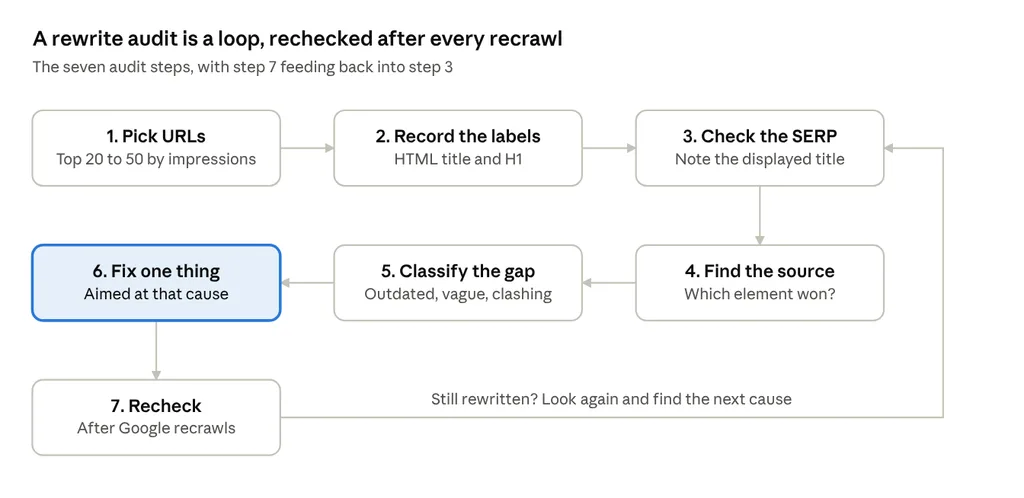
- Pull the URLs with meaningful organic impressions from Search Console. Start with the top 20 to 50.
- Record the HTML title and the H1 for each, using a crawler, the page source, or Chrome’s AI assistant.
- Search the page’s main queries and note the title link Google actually displays.
- Compare the displayed title against the tag, the H1, the og:title and other prominent text, and find where Google took its wording from.
- Classify the gap: outdated, inaccurate, vague, boilerplate, conflicting, or unclear main heading.
- Make one targeted change per page, aimed at the cause you identified. Rewriting every title at once makes it impossible to learn which fix worked.
- Recheck after Google has recrawled and reprocessed the page.
title rewrite audit · 7 steps, 1 loop
One fix per loop keeps the cause and effect readable: if the rewrite survives a recrawl, you know that cause was the wrong one.
I track it in a sheet with these columns:
| URL | HTML title | H1 | Observed Google title | Issue type | Action taken | Review date |
|---|---|---|---|---|---|---|
| /example-page/ |
Two cautions. Search Console has no report that lists every title rewrite, so the observed title column is manual work. And a single search is a single observation. Google’s own documentation suggests checking whether the displayed title better fits the query, so I check a page against two or three of its main queries before I record a rewrite as real.
How long does Google take to reflect title changes?
Google’s answer is that it has to recrawl and reprocess the page first, and that this “may take a few days to a few weeks.” That range is honest, and I would resist giving clients anything tighter.
Two things happen in sequence, and teams often treat them as one. Changing the HTML title updates your page the moment you deploy. Google reflecting that change happens only after Googlebot fetches the new version and the index is updated. A page that gets crawled daily will move faster than a deep product page Google visits once a month.
For important pages, use the URL Inspection tool in Search Console to confirm Google has seen the new version, and request indexing if it has not. Then give it time before judging the result.
Can you force Google to use your exact title?
No. Google states plainly that it can’t manually change title links for individual sites. You can influence the title link by giving Google clear, consistent information. You cannot set it.
Four misconceptions come up in almost every conversation I have about this.
“Changing the title tag guarantees a matching result.” It raises the odds when the new tag fixes the actual cause. If the H1 still contradicts it, Google may keep using the H1.
“Adding more keywords forces Google to use the title.” It does the opposite. Repetition is one of the patterns Google lists as low value and potentially spammy, which gives it a reason to look elsewhere.
“Structured data overrides all other title sources.” WebSite structured data is one listed source, tied to site names. Nothing in Google’s documentation describes it as an override.
“Every title rewrite is an SEO penalty.” A rewrite is Google choosing display text. It carries no documented ranking consequence, and in many cases Google’s version is a reasonable read of the page. Treat it as feedback on how clearly the page states its subject.
Frequently asked questions
Why is Google showing a different title than my title tag?
Google found text on or about the page that it judged a better description than your tag. The usual reasons are an outdated, vague, inaccurate or boilerplate tag, or a tag that conflicts with the H1.
Does Google rewriting my title affect rankings?
Google has not documented any ranking effect from title rewrites. The real effect is on click-through rate, because the wording searchers see changes. Whether that helps or hurts depends on the rewrite, so measure CTR in Search Console before and after.
Does Google use the H1 instead of the title tag?
Sometimes. Heading elements and the main visible title are documented sources, and in my experience the H1 is the most common replacement when the tag and the heading disagree.
Can a meta description influence the title link?
The meta description does not appear in Google’s list of title link sources. It is a candidate for the snippet under the title link.
Should my H1 and title tag be identical?
They do not need to match word for word. They should describe the same page. A title tag can carry the brand name and be tuned for the search result, while the H1 reads naturally for someone already on the page.
How can I check the title Google displays?
Search the page’s main queries and look at the result. A site: search with the URL is a quick spot check. Check more than one query before drawing conclusions.
How long does it take for Google to update a title?
Google says a few days to a few weeks, after it recrawls and reprocesses the page.
Can I stop Google from rewriting my title?
You cannot switch rewrites off. You can make them much less likely by keeping the tag accurate, specific, unique and consistent with the visible page.
Optimize the page, then the tag
The title tag still matters. It remains the source Google uses most often, and it is the one you control most directly. It is also one of nine signals Google lists, and the others are all things on or around your page. When they agree, Google has little reason to look past your tag. When they disagree, Google picks the one it trusts, and that is usually what a visitor can see.
So here is the action I would take this week. Pull your ten highest-impression pages from Search Console, put each title tag next to the title link Google is actually showing, and look at the ones that differ. Each mismatch tells you something specific about how Google is reading that page, and most of them take ten minutes to fix.